

Automated software is technology that runs tasks, tests, and processes with little or no human input.
As a long-time practitioner in software delivery and operations, I will walk you through what is automated software and why it matters now. This article explains the core ideas, types, workings, benefits, risks, and practical steps to adopt automated software. I combine hands-on insights, clear examples, and actionable advice so you can understand the topic fast and apply it with confidence.

Understanding what is automated software: definition and core concepts
Automated software is any program or system designed to perform tasks automatically. It reduces or removes the need for manual intervention in repetitive, rule-based, or scheduled activities. Common uses include testing, deployment, monitoring, data processing, and customer interactions.
When people ask what is automated software, they often mean tools that replace routine human actions. These tools follow rules or algorithms. They can run on schedules, react to events, or follow workflows. Modern automated software increasingly uses AI to handle complex decisions.
Key components of automated software:
- A trigger that starts the process, such as a schedule or event.
- A set of rules, scripts, or models that define actions.
- Integration points to external systems like databases or APIs.
- Logging and reporting to track outcomes and errors.
- Feedback loops for monitoring and improvement.

Source: dynatrace.com
Types and categories of automated software
Automated software comes in many forms. Each type serves different goals and challenges.
Popular categories:
- Test automation: Tools that run unit, integration, and UI tests automatically.
- DevOps automation: Pipelines for building, testing, and deploying code.
- Business process automation: Systems that automate workflows like invoices and approvals.
- Robotic process automation (RPA): Bots that mimic human actions in user interfaces.
- Monitoring and observability automation: Alerts and auto-remediation for system health.
- AI-driven automation: Systems using machine learning to make predictions and choices.
How to choose a category:
- Match the tool to the problem you need to solve.
- Prioritize reliability and maintainability.
- Consider scale, integration needs, and security.
Source: scnsoft.com
How automated software works: components, workflows, and examples
Most automated software follows a simple flow. This makes it predictable and testable.
Typical workflow steps:
- Trigger: An event starts the process, like code commit or scheduled time.
- Input: Data or state is collected from systems.
- Processing: Rules, scripts, or models decide what to do.
- Action: Changes are applied, such as deploying code or sending emails.
- Output: Results are logged and reported.
- Feedback: Monitoring feeds outcomes back to improve the system.
Example 1 — Test automation:
- A developer checks in code.
- A CI pipeline runs unit tests automatically.
- Failed tests stop the build and notify the team.
Example 2 — RPA for order processing:
- An RPA bot reads email orders.
- It logs orders into an ERP system.
- It sends confirmation emails and updates status.
These examples show how automated software reduces manual steps. They also highlight the need for clear rules and robust error handling.
Benefits of using automated software
Automated software delivers measurable gains. These benefits drive adoption across industries.
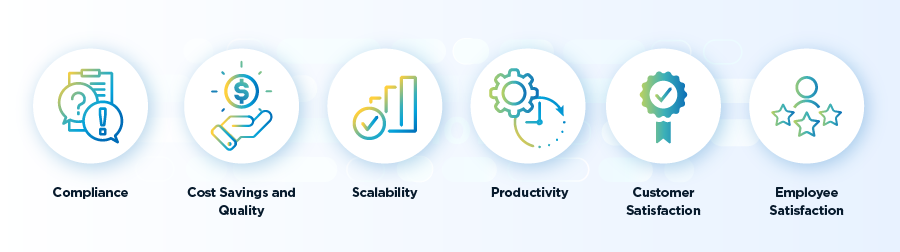
Key benefits:
- Time savings by removing routine work.
- Higher consistency and fewer human errors.
- Faster delivery of features and services.
- Improved compliance through audit trails and repeatable processes.
- Cost reduction as teams focus on high-value tasks.
- Scalability to handle more work without proportional headcount increases.
A personal note: I once automated a nightly data sync that used to take three staff hours. After automation, the job completed in 20 minutes and ran every night without supervision. That freed the team to focus on analysis instead of manual fixes.
Challenges, risks, and limitations of automated software
Automation is powerful, but not perfect. It introduces new risks and trade-offs.
Common challenges:
- Over-automation can hide problems instead of solving them.
- Fragile scripts break with UI or API changes.
- Security risks if credentials and access controls are not managed.
- False positives or negatives in monitoring can cause noise.
- Initial setup and maintenance costs can be high.
Mitigation strategies:
- Start small and automate low-risk tasks first.
- Use robust integrations and version control.
- Implement least-privilege access and secrets management.
- Monitor outcomes and refine rules continuously.
- Keep humans in the loop for exceptions and critical decisions.
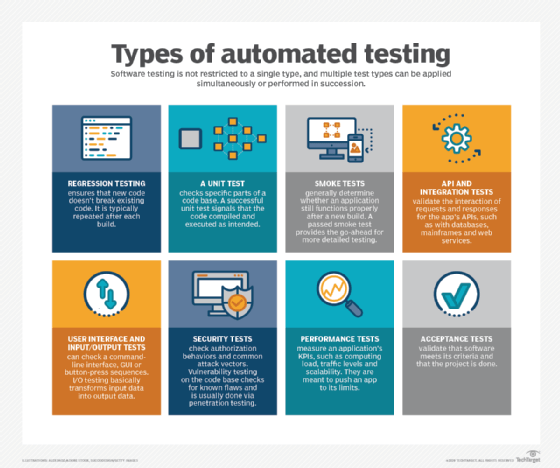
Source: techtarget.com
Implementing automated software: step-by-step best practices
A structured approach increases your chance of success. Use clear steps and measurable goals.
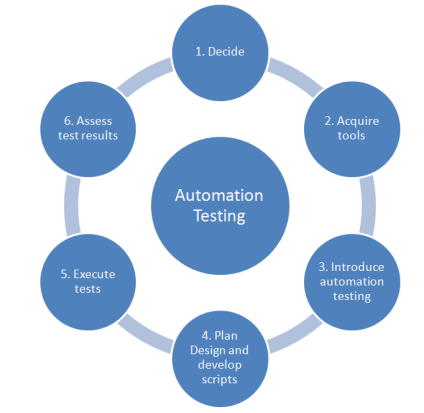
Implementation steps:
- Define clear goals and success metrics.
- Map current manual workflows and pain points.
- Choose tools that integrate well with your stack.
- Prototype with a small, high-impact task.
- Automate, test, and document the process.
- Monitor performance and collect feedback.
- Expand gradually and train the team.
Best practices:
- Keep automation simple and modular.
- Treat automation code like production software.
- Use version control and code reviews.
- Plan for rollback and error handling.
- Measure ROI and adjust priorities.
In my experience, the most common mistake is skipping monitoring. If you automate and then ignore results, failures compound. Invest a little time in dashboards and alerts.
.png)
Real-world examples and personal experience
Real examples make the idea of automation tangible. Here are practical scenarios I worked on.
Example A — Automated deployments:
- Problem: Manual deploys caused downtime and delays.
- Solution: Implemented a CI/CD pipeline for automated builds and canary releases.
- Result: Deployment time dropped from hours to minutes and failures were easier to roll back.
Example B — Helpdesk automation:
- Problem: Repetitive ticket triage slowed the support team.
- Solution: Implemented automation to classify and route tickets based on keywords and history.
- Result: First response time improved and staff focused on complex cases.
Lessons learned:
- Start with the smallest repeatable task.
- Involve stakeholders to avoid automating bad processes.
- Document exceptions clearly.
- Expect and plan for change; automation requires maintenance.

Source: radixweb.com
Frequently Asked Questions of what is automated software
What is automated software used for?
Automated software handles tasks like testing, deployment, data processing, and customer workflows. It reduces manual effort and improves consistency.
Is automated software the same as AI?
Not always. Some automated software follows fixed rules, while AI-driven automation uses models to make decisions. Both can work together.
Can automated software replace humans?
It replaces routine work but not human judgment. People remain essential for design, oversight, and complex decisions.
How secure is automated software?
Security depends on implementation. Proper access control, secrets management, and auditing make automation safer.
How do I start automating in my organization?
Begin by mapping simple, repeatable tasks. Prototype with one tool, measure results, and scale gradually.
What skills are needed to work with automated software?
Core skills include scripting, basic software development practices, system integration, and monitoring. Understanding business workflows helps too.
How much does automated software cost?
Costs vary by scope and tool choice. Consider initial setup, licensing, integration, and ongoing maintenance when estimating.
Conclusion
Automated software transforms how organizations work by removing repetitive tasks and speeding delivery. Understanding what is automated software helps you pick the right tools and avoid common pitfalls. Start small, measure impact, and build robust monitoring to keep systems healthy. Take one routine task this week and automate it; you will free time and reduce errors. If this article helped, leave a comment, share your automation plans, or subscribe for more practical guides.


